
October 8, 2026
Vallic Cloud is live: all the infrastructure, almost none of the ops
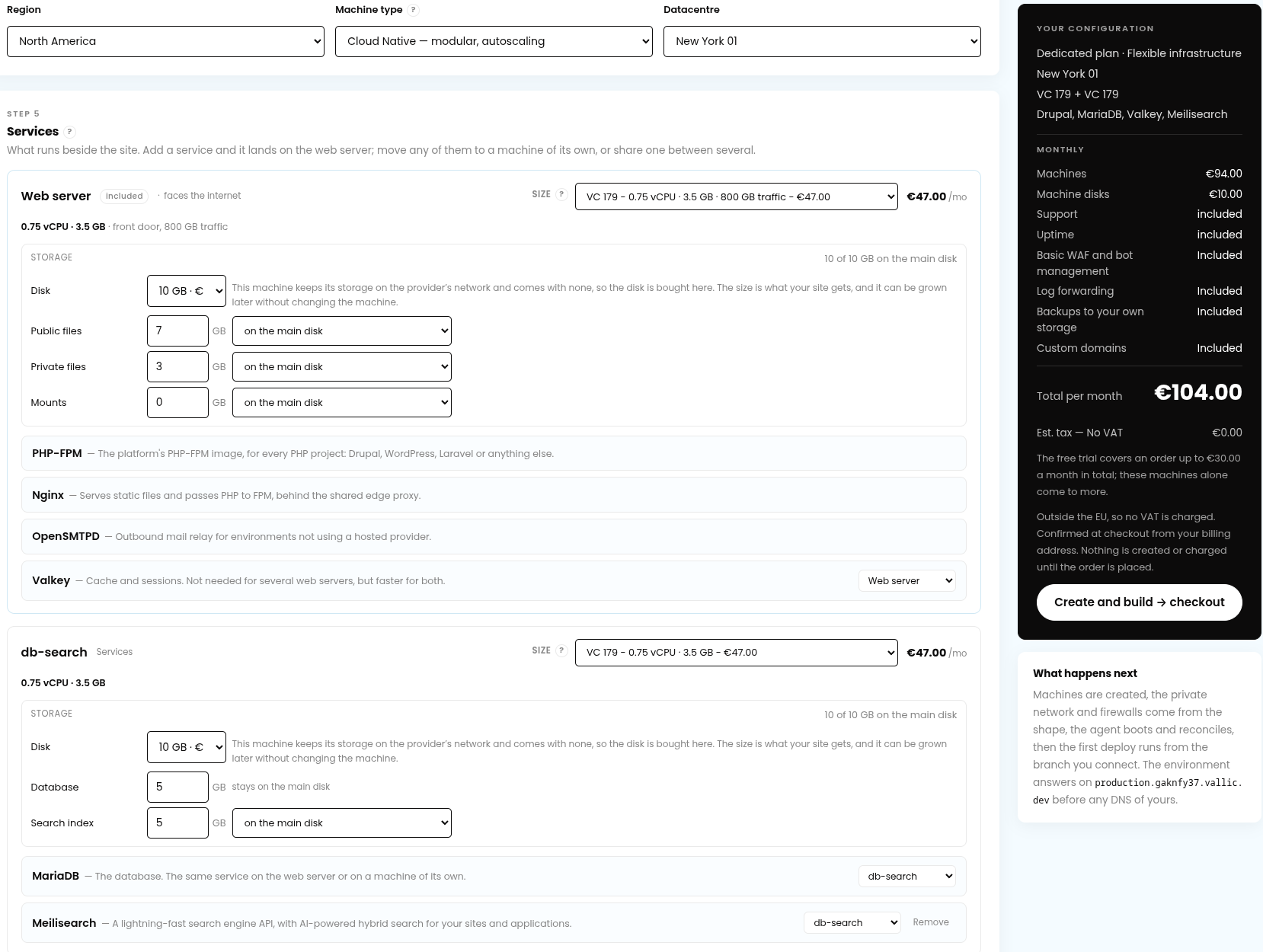
Today we're opening Vallic Cloud to everyone — the hosting platform we built out of years of running other people's sites. Sign in at console.vallic.com, read the handbook at docs.vallic.com, and see what a machine costs before you talk to anybody at vallic.com/cloud/pricing.
Why we built it
Vallic is a Croatian Drupal company, founded in 2014 by people who have been building with Drupal since 2008. Drupal is at the core of what we do — but along the way we have also built and run WordPress and Laravel applications, Node.js services and Go apps, from brochure sites to cross-border webshops. Client deployments are our day job: the shop that must not go down on Black Friday, the site that gets one visit a day until a minister mentions it on television, the intranet that suddenly needs to serve ten thousand people.
Running those taught us two things.
First: every client's needs are genuinely different. A brochure site and a cross-border webshop should not be forced through the same template. One needs to cost almost nothing; the other needs its own machines, a topology drawn around its traffic, an uptime promise with teeth. We spent years bending existing platforms around that variety, and there was always a part that didn't fit — the plan that couldn't split the database onto its own machine, the environment model that stopped at staging, the invoice that charged per request.
Second: the operations work is the part nobody should be doing by hand anymore. We have done the kernel upgrades at 2 a.m., the certificate renewals discovered by their expiry, the backup that turned out never to have run. That experience is exactly what we automated.
So we built the platform we wanted to run for our own clients, and then we opened it up.
What it is
A project is one application — a site, a shop, an API. You configure it once, top to bottom, on a page that reprices as you choose: the plan, the shape, the application, the datacentre, the services, the edge, the add-ons, the billing period. You see the full price before you sign up, and nothing is bought until you build an environment. Deployments come from your Git repository, configured by one vallic.yaml file in the root.
Two plans, for the two kinds of customer we actually have (docs: plans):
- Dedicated — from €13/month (€16.25 with Croatian VAT). Machines belonging to a single project, in any topology you configure. Production is included; staging, development and feature branches share one preview machine you add when you want them.
- Shared — from €31/month (€38.75 with VAT). Up to 25 small projects of your own on one machine, production only. The machine is shared between your projects, never between customers. Built for freelancers and small dev shops.
42 datacentres across six continents, each with its real price on the price list. Pick a Regular machine, its disk included, when the price matters most, or a Cloud Native one, its disk a volume of its own, when you want to resize it both ways and let it scale.
Drawn shapes, not fixed tiers. On a dedicated plan you draw the layout: one machine running everything, or the database on its own for its IO, Solr and the broker sharing a box, a worker keeping the site's CPU free — over a private network the platform creates the moment there's a second machine. Or the fully dedicated shape: a load balancer, two or more web servers, and every service on a machine of its own.
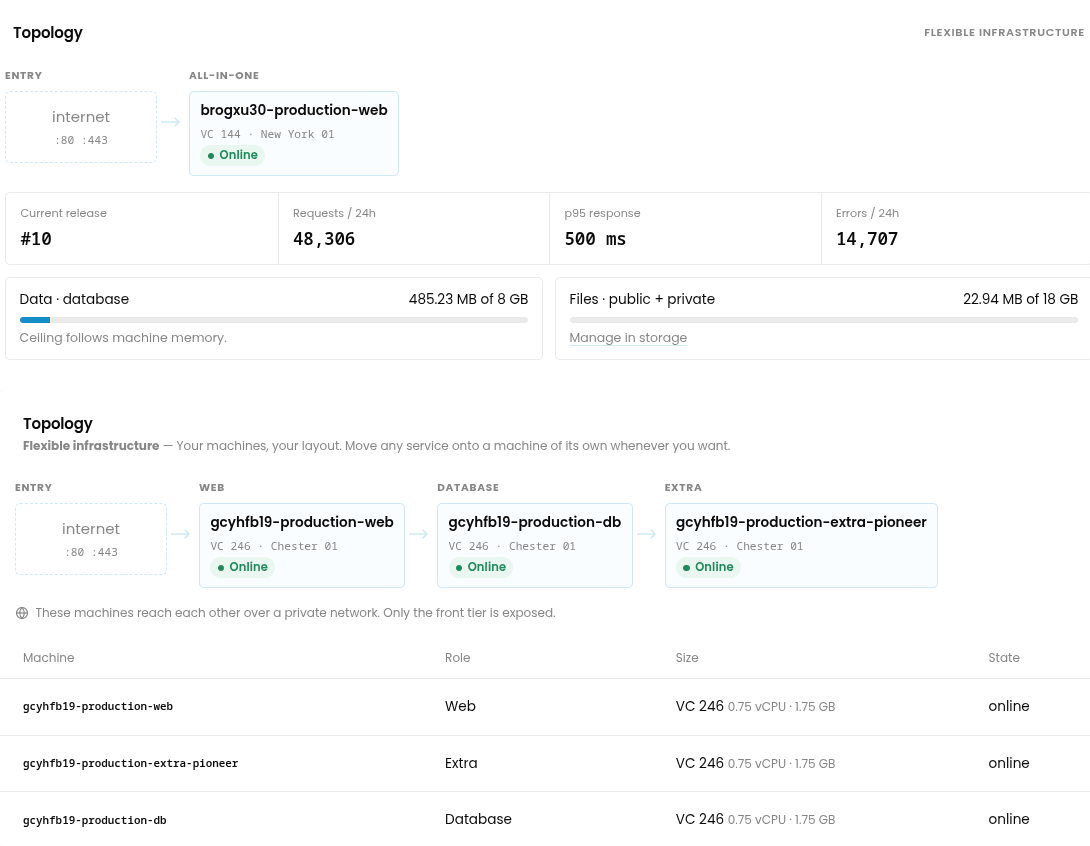
The stack, ready to run. PHP, Node.js and Go applications; Drupal, WordPress, Laravel and Symfony first-class. Managed services beside them: MariaDB, MySQL 8, PostgreSQL, Redis, Valkey, Memcached, Meilisearch, Solr with ZooKeeper, RabbitMQ, Varnish, and an outbound mail relay. Every stack has a complete, deployable example in github.com/Vallic/vallic-cloud-examples, so nobody starts from a blank file.
Environments that match how work happens. Production, staging, development and feature branches, each with immutable releases, one-click deploy and rollback, and a full activity log.
Backups, offsite, on two providers. Every production database and its files, every night, two copies on different providers away from the machine, four days of them included. Thirty days and a four-hourly database schedule are add-ons. Restorable to any environment.
Everything a project has is on one invoice: twenty-two integrations connected once (GitHub, GitLab and Gitea; Datadog, New Relic, Loki, Splunk, Axiom, Logz.io and OpenTelemetry; S3, SFTP and rclone; Slack, Telegram, Discord, PagerDuty and webhooks; Bunny, Cloudflare, Fastly and Akamai), log forwarding included, and teams priced per project — the first person free, and a contractor invited to one site counted on that site's invoice and nowhere else.
Filtering the automated internet
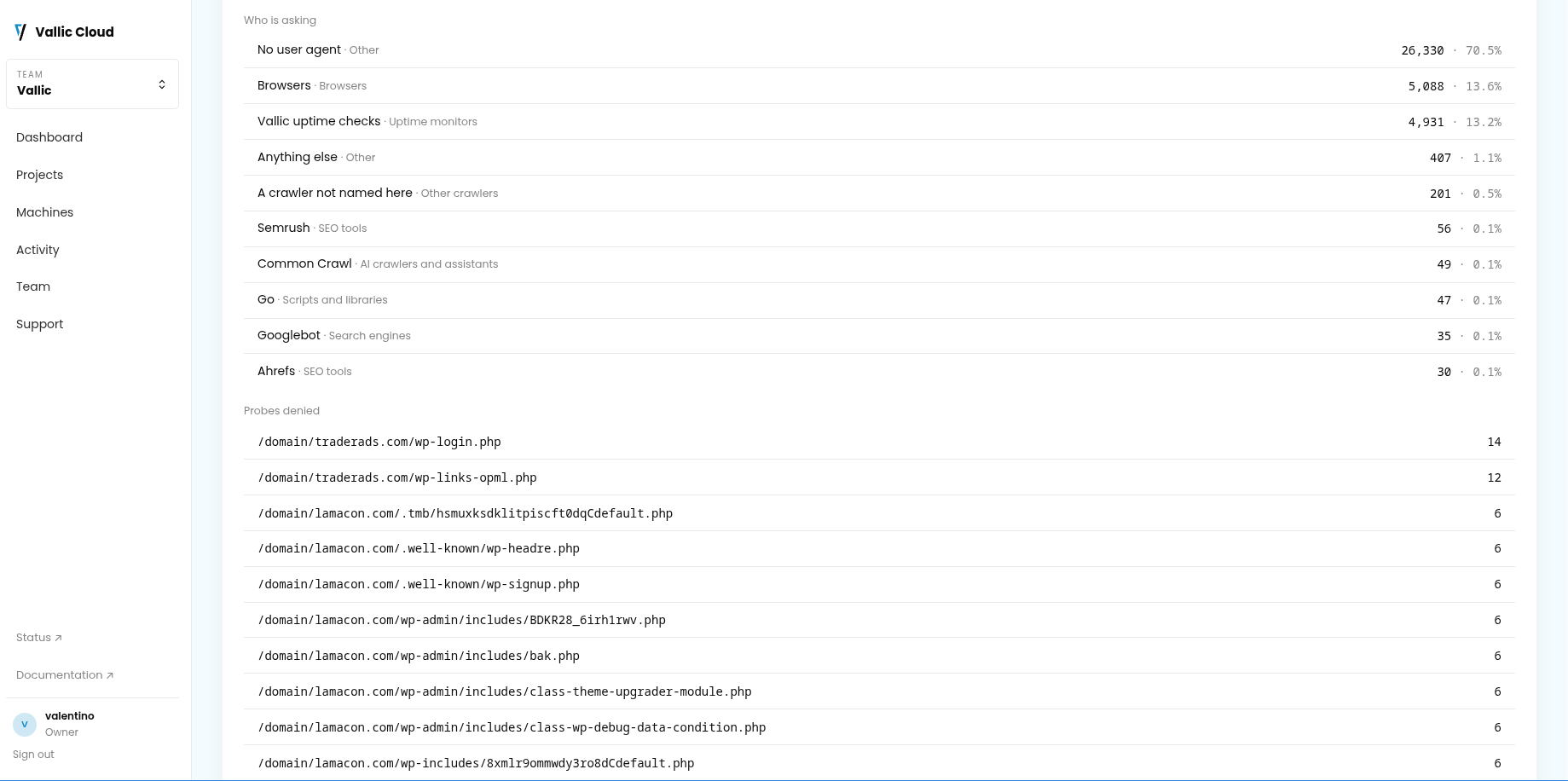
Most traffic on the web today is not people: crawlers, scanners, scrapers, agents — a share that grows every year. The usual answer is to put Cloudflare or a service like it in front, and that works for the big, visible bursts. What it does not catch is the slow rain: thousands of automated requests scattered across a day, each too small for anyone to call an attack, all of them landing on your machines and spending your CPU, your database and your bandwidth.
So a basic WAF and bot management come with every project, at no cost, on the platform's own edge. It turns away the path probes, the fingerprinted tooling, and the paths, agents and behaviours you name, before they cost anything. It is deliberately basic — not a replacement for your CDN, but the layer that spares your machines what the CDN lets through. Once a month you get a report of what it turned away, by kind and by family of bot, so it is something you can see rather than something you take on trust.
Scaling, billed by the day
No charge per request — a page served a million times costs its bandwidth and nothing else. When a site needs more than it was bought with, there are three ways to give it more (docs: scaling):
- Resize for good, at the new size's ordinary price.
- Autoscale (beta): on Cloud Native machines, one size up when the CPU stays busy, back down once it has been quiet, never past the ceiling you set.
- Upscale for seven days: for the launch, the campaign, the minister on television — a bigger machine for a week, then back.
The time spent bigger is billed by the day, only while it lasts. If you decide the bigger size should stay, keep it, and it goes on the contract at its ordinary price.
Support with the numbers written down
Every project — on every plan, at every price — carries a committed 99.9% uptime SLA with service credits. Uptime is a commitment, not something you buy your way into. Advanced support adds a guaranteed 60-minute response on urgent tickets, with 99.95% committed; Premium, 30 minutes and 99.99%.
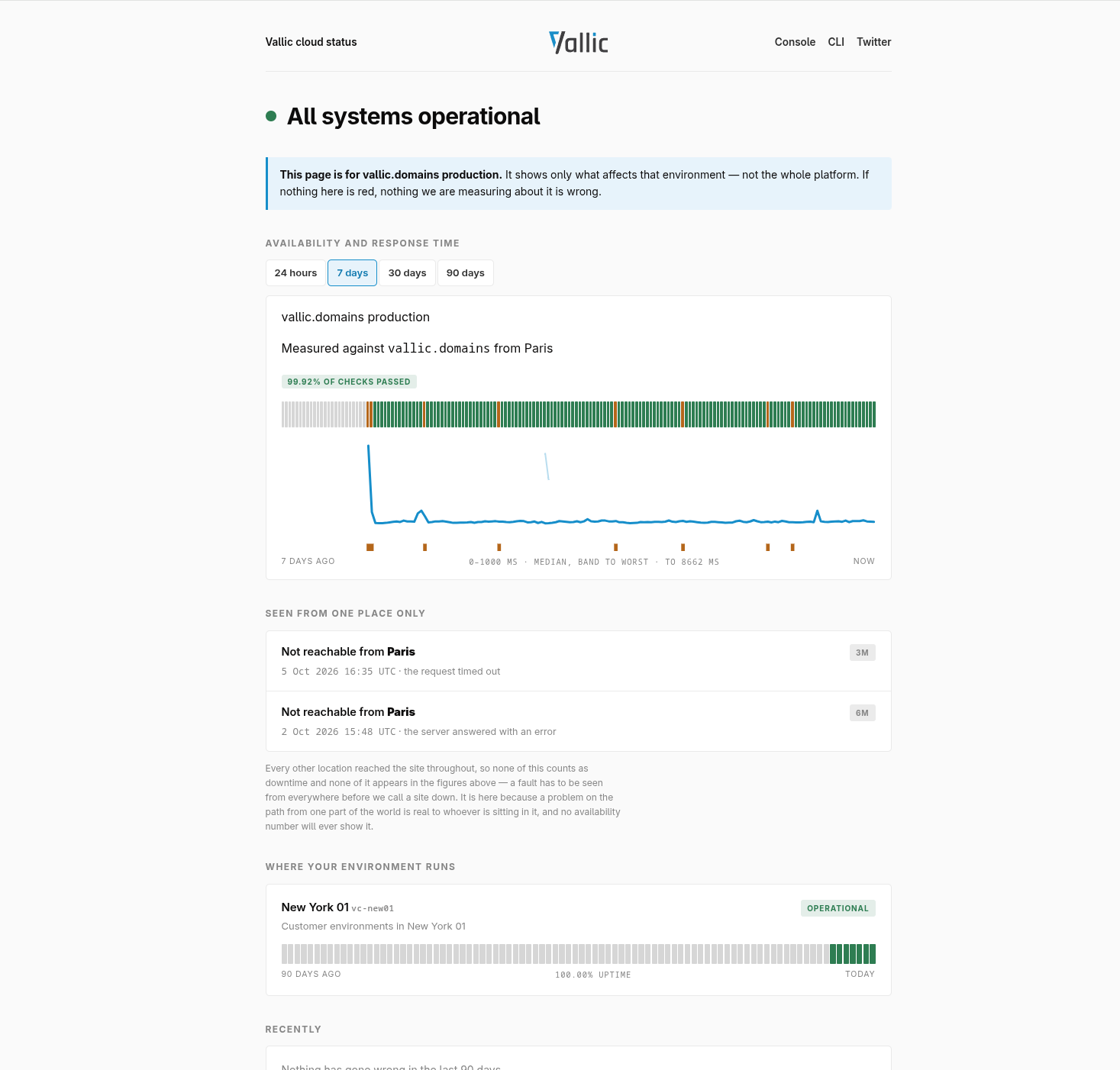
You do not file a claim. Availability is measured from outside, by three probers on a provider of its own, and published at status.vallic.net. A month that missed has its credit worked out from those measurements and applied to your next invoice, as a share of what the machines that were down cost, not of the whole account.
Every project gets a status page of its own the moment it runs on your domain: its availability and response times, any incident affecting it, and the datacentre it runs in — nothing about anybody else's. Give the link to whoever asks you whether the site is up, before they have to ask. Here is ours, for vallic.domains.
Run your own containers — because AI changed what people build
Here is the feature we're proudest of.
The sites people build today are not just sites anymore. With AI, a two-person team can build what used to take a department: a storefront with a background remover in the checkout, a publishing pipeline that runs a thumbnailer and a summarizer, an API that calls a model nobody else needs. The web part is the easy bit now — and then all of it needs somewhere to run.
Most answers to that start with "get a Kubernetes cluster", or move the extra pieces to a second platform with a second invoice. No managed Drupal or WordPress host we know of lets you put a container of your own beside the site.
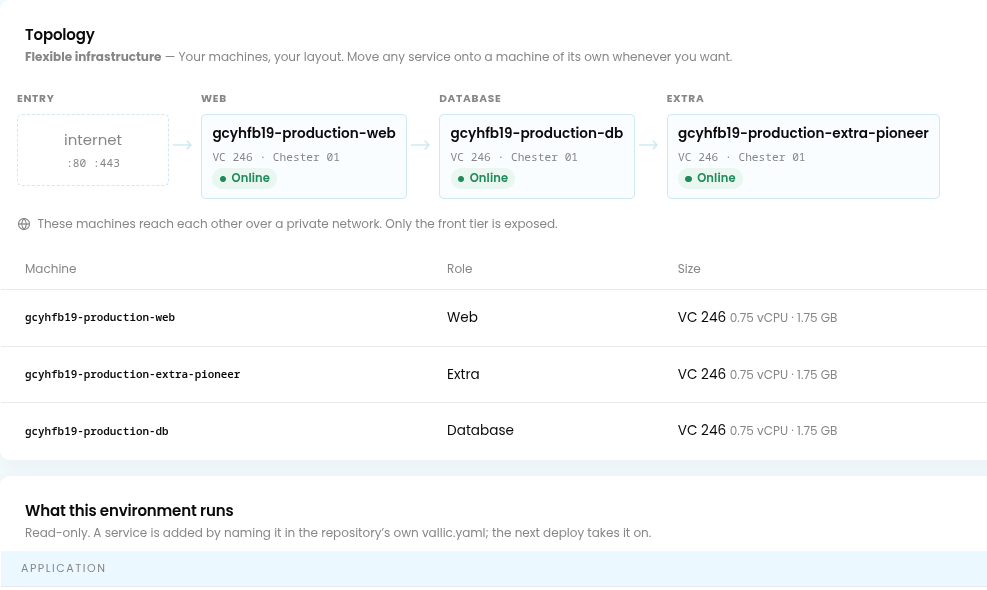
Vallic Cloud's answer is extra machines: a slot beside your project, bought in the configurator like any other, filled by a compose fragment in your vallic.yaml. Any image, from any registry: a background remover, a thumbnailer, a small model, a tool you wrote last week. (A working example ships in vallic-cloud-examples.)
- You bring the image; the platform brings everything else — the machine, the network isolation, the logs, the metrics, the redeploys. The platform refuses only what would be unsafe, and says why.
- Rootless by design. Extras run on rootless Podman: no Docker socket to mount, no host filesystem to reach. One environment's extra cannot reach another's, or the database, unless you say it can.
- Not a second project. An extra is a line on the same project, the same team and the same invoice as the site it serves.
Built to be deployed by an AI, if you want
Vallic Cloud is built for developers — a Git push, one vallic.yaml, and a CLI for the things people do every week. But it is also built for the way a lot of software is written now: by people prompting, not provisioning. Someone shipping their first real application should not need to learn what a systemd unit is to put it online.
That is why the whole handbook is one Markdown file, published for exactly this purpose at docs.vallic.com/llms-full.txt. Give it to Claude, or any assistant that takes a file, and the platform is describable end to end — the plans, the shapes, every key vallic.yaml takes, what a deploy does and in what order. A few prompts that work well:
You are deploying a Laravel application to Vallic Cloud. Attached is the platform handbook. Write the
vallic.yamlthis app needs, and tell me what I will be asked in the configurator and in what order.
Here is the Vallic Cloud handbook. I have a Drupal 11 shop with a Solr index, a Redis cache and 8 GB of product images. Design the topology, write
vallic.yaml, and explain what each machine does and what it costs.
Attached is the Vallic Cloud handbook and a repository that builds a container for background image processing. Write the compose fragment for an extra machine that runs it beside my site, and tell me what the platform will refuse and why.
The answer to the third one is not a guess: the handbook documents what a fragment may name and what the platform refuses.
Moving in
- Console: console.vallic.com
- Docs: docs.vallic.com — and the whole handbook as one file for your assistant: llms-full.txt
- Examples: github.com/Vallic/vallic-cloud-examples
- Pricing: vallic.com/cloud/pricing
- Status: status.vallic.net
- CLI: github.com/Vallic/vallic-cli — one static binary, no dependencies
- Migration: we move your site for you. Get in touch.
Launch offer: Three days on us, for a configured project of up to €100 a month (excl. VAT). Use the code VALLIC at checkout. During the trial a project runs as ordered; resizing up and scaling open once the first invoice is paid.